Prepaid SIMs
You can suspend Prepaid SIMs from the SIMcontrol platform at any time. This means the SIMs will not be monitored or recharged.
Note that prepaid SIMs will still remain active on the network.
Step 1:
On the SIMs list select Bulk Search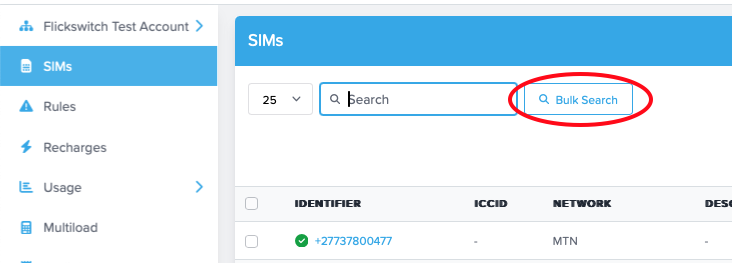
Copy and Paste the list of SIMs you would like to bulk suspend
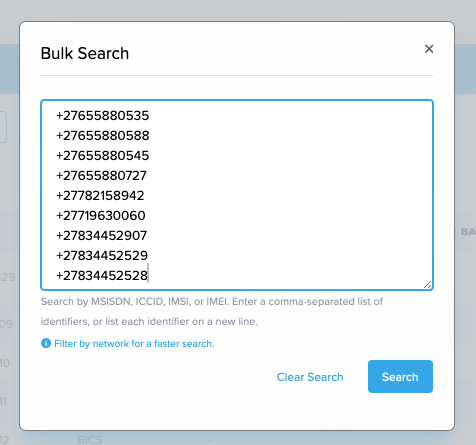
Step 2:
Once you have bulk searched. Click the select all check box and then the Select all x SIMs text.
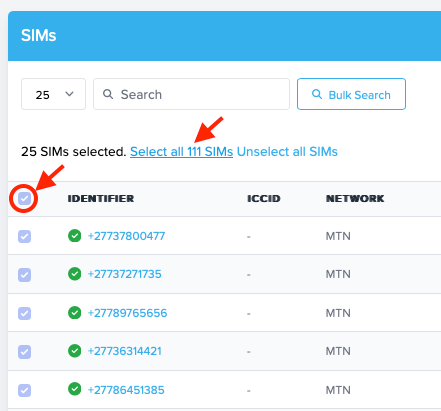
Step 3:
Once you have selected all your SIMs. Click on the "Bulk Actions", then select"Activate/Suspend"
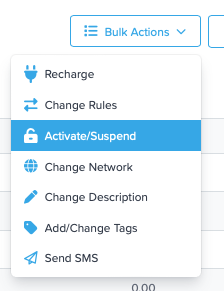
Step 4:
You will be presented with the following modal. Double check that the sim count is correct and then select Suspend SIMs.
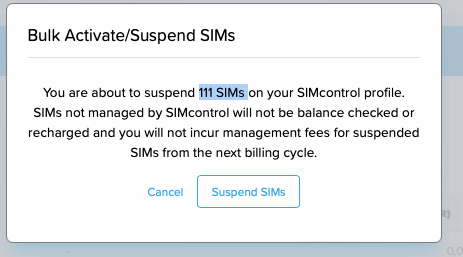
All your selected SIMs should be now suspended.
Depending on the number of SIMs you are suspending it could take a little while.
Note that prepaid SIMs will still remain active on the network.
On Billed Contract SIMs
On-billed contract SIMs cannot be suspended directly — the underlying network contract must first be cancelled. You can request this yourself on SIMcontrol:
- On the SIMs page, filter by Billing Type = On Billed (or use Bulk Search to paste your list of SIMs).
- Select the SIMs, then go to Bulk Actions → Request Cancellation.
- Review and confirm. Results (including any failed requests, with reasons) are displayed.
Our support team then processes the cancellation with the network per each contract's terms — notice periods apply. Track progress by filtering Contract Status = Cancellation Requested. Once the network processes it, the SIM moves to Suspended and incurs no further costs. If a cancellation penalty applies, support will contact you.
Full guide: Requesting Contract Cancellations
Tags: Delete SIM, Suspend SIM, Cancel SIM, Onbilled, On Billed, Contract
Was this article helpful?
That’s Great!
Thank you for your feedback
Sorry! We couldn't be helpful
Thank you for your feedback
Feedback sent
We appreciate your effort and will try to fix the article